Software installation woes on Linux
Installing software on Linux is not only easier than most of us think, but it also has some special features which help software’s to be updated automatically!

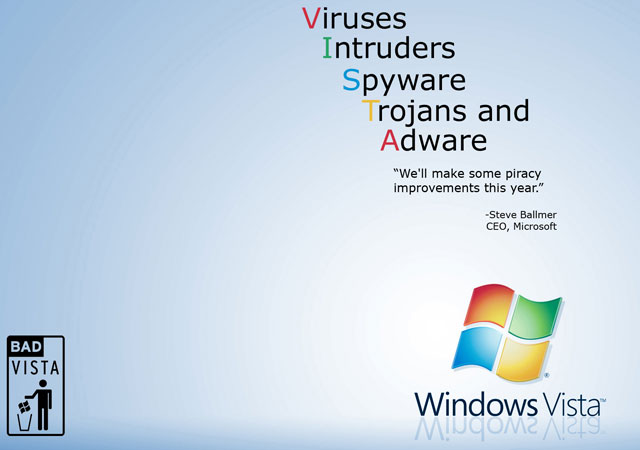
Windows Vista Everything Included

Illustration from Let’s Learn Linux

Everything IncludedMicrosoft Vista comes built-in with everything!


While we gracefully installed our favorite Linux distro, one of the mundane problems which most users face is - installing a new software. In the beginning, software installation on a Linux distro can seem extremely intimidating while using a terminal but more often than not we can install things graphically. Installing software on Linux is not only easier than most of us think, but it also has some special features which help software’s to be updated automatically!

Primarily, there are 3 main ways to install a software on Linux.

  • Downloading a package which is a .deb/.rpm file.
  • Using apt-get with a software repository.
  • Lastly, by compiling the source yourself - we shall take this in an elaborated article, very soon.

Downloading a package which is a .deb/.rpm file

The first way of installing software is by using a .deb/.rpm file. As mentioned in one of our previous articles, .deb refers to installation files associated with debian based distros and .rpm files are RedHat based package manager files.

Here and thereafter, we shall concentrate on .deb files whenever we happen to encounter both the flavors. Remember that there is not much of a difference in the way they’re executed. It it is just that how these are fabricated depending on the underlying distro they are meant for - debian or RPM based.

Coming back to the first way of installing software, this method is pretty similar to installing a software on a MS windows with an executable file. Just download a .deb file for the software you want to install, double click to open it via the default package manager- synaptic in case of ubuntu (debian) and type in your password when prompted. We hope you’d have speculated which password should this be! Installing a software by this method shall automatically check for any additional dependencies you may need and will download and install them too.

One of the disappointing fact about this type of installation is not every program created for Linux has a .deb for users to use for installation. Also, new programs generally do not have a .deb at first until they get more users and popularity. Lastly when the software is updated it will not automatically update, you will need to uninstall it then grab the new .deb package.

A great website to get .deb packages for popular Linux programs is getdeb.net.

Using apt-get with a software repository

The second way of installing programs is by using a software repository. The advantages of installation through a software repository is that when a program is updated, the update manager will let you know and you can update all such software’s with click a few clicks. Most Linux distributions have several popular programs built into there own software repositories which are already set up for you to use.

Depending on your knowledge there are again two ways of installing softwares from a repository. Most modern Linux distributions have a built-in GUI way to find and install software.

For example, on Ubuntu if you navigate to System > Administration > Synaptic Package Manager. Within the package manager, a complete list of software’s is available. One can select and install them with a few clicks of the mouse button. A user can even do a search for a software. Secondly, we can also use the repositories by the CLI.

Shoot a terminal and type, “sudo apt-get install <software-name>” without the quotes. The sudo command gives the computer root privileges to be able to make an installation. Apt-get command tells the computer to get software from the repositories, download and install it.

There may be several software’s which may not be located in the repositories that your Linux distribution manages and comes with, as a default. In such an event, you may have to add more repositories. In Ubuntu you can add a software repository by navigating to System > Administration > Software Sources.

In the window that pops up, choose the “Third-Party Software” tab and click the “add” button. Copy and paste your repository address in the desired location. A repository address will look something like this: deb http://archive.ubuntu.com/ubuntu/ hardy main.

Out of the 2 ways, which we’ve discussed, the best one is to install a software by using a software repository. This method is fairly easy and keeps the software’s up-to-date automatically.

Compiling the Source

The third method is one which is universally valid for all linux distros and is pretty common amongst the Linux pros and geeks. I’m sure we all would love to have a hands-on session on the same. But this is a more detailed and (may appear to be) a tedious process for the newbies. For this very reason, we’ll take care of the command line source compilation method in one of our upcoming article. Stay connected!
Praval, the author of this article is available as a freelance writer and technology blogger. He writes reviews and stuffs related to Wordpress, Linux, Information marketing, Open Source Softwares, Life hacks and technology in general. He also provides information marketing solutions to his clients. You may reach him at Praval.com.


Don't like it? There are lots of published articles, pick a random one.

oCricket

Praval Singh posted this article on Mon, Jun 16th, 2008 at 8:05 am
Categorized under Featured, Linux, Technology and has the following tags

Suggest 1 or more tags for this article

Use a comma (,) to separate 2 or more tags.

[?]

Prev Article: The power of ‘root’ in Linux

Next Article: Shoot a terminal and install a ball


Possibly Related Articles

Archives: Visit the Archives for more articles.

Comments Post Yours

There are 18 responses so far. You can follow any responses to this entry through the RSS feed. You can leave a response, or trackback from your own site.

  1. Surely the first two blocks are the wrong way round?
    The first way of installing software is through the distributions support software repository and the second way is via deb or rpm if the application you want isn’t already in the repository.
    Aslo i’m not sure why you’ve called the article software installation woes. Using the official repositories normally means that installing software is a piece of cake.

  2. Hi bragehshwar, I think you have only used Ubuntu Line ?, thanks for the detailed post but I think you have missed Click and Run , Mint Install , Synaptic Manager, Yast 2 , RpmDrake [Mandriva] and lots more..

    Though I agree Source compilation is a headache for newbies that’s why developers should provide respictive packages .rpm,.deb for eaaase of install :)

    Regards

  3. @Shashwat: Hi buddy! It’s me Praval who’s been authoring Linux related posts for Brajeshwar. I’ve been using Linux for the past 2 years and have tried ,my hands on Fedora, Mandriva, OpenSuse, Mint, et al. I now use Ubuntu-Hardy. As I mentioned in my post, each distro has a package manager to help install the softwares from repositories. Ubuntu has apt-get as one of the package managers. OpenSuse and Fedora have yum and yast, etc. It would not be possible to explain all of them, but what I have tried is to share the concept of how they work and what do they mean. I shall be coming up with the source compilation soon. Thanks for your comments!

  4. I used an ubuntu computer at work for 2 months before I installed it on my computer, and didn’t realize how much of an issue installing software would be cause I had never done it before. Searching on google for 30 seconds made it a cinch, but to someone that wouldn’t do that intuitively, it’s probably pretty mind-boggling.

    I don’t know why major distros don’t include a ‘weclome to Linux’ type tutorial after installation - it would probably help completely new users learn to get used to the new ways of doing things in Linux and it doesn’t have to be very intrusive if you’re an experienced user.

  5. This article should’ve been titled How-to install in Ubuntu rather than Software installation woes in Linux. I see no mention of installing from yum, portege, zypper, smart, 1-click installer(wonder if the author has heard of it), neither has the author mentioned about any “woes”.

  6. Jumped the gun regarding the different package managers(my apologies, read your comment rather late), But still I say that the post should’ve been titled differently.

  7. @Satya: So atleast you now know that the author has heard of various package manager jargons you used .. eh! These posts are not to scare the newbies with jargons and tech-vocabs. If you need some serious sessions, you may get in touch with me via my website/email. Also, I would request you to have a look at the comments for your answers before you shoot a question/response. No offense though :p

    Secondly, about the title thing, I wanted the newbies to hit here and visualize that installing a software on any linux distro is not as difficult as taming a squirrel! I agree the title you suggested would have also been perfect, but then we are two different indivisuals :) Cheers!

  8. Yup, I should have looked through the comments, but like I said I jumped the gun, sorry about that.
    And you have quite a valid point there, I see why you’ve given a title like this one.
    Cheers and looking forward to more articles.

  9. @ Sathya: Thanks for understanding. I hope I’ll be sharing some great articles with you, very soon! Cheers :)

  10. it’s good that u r showing how to insatall software on linux. but do u think that vista is to bad to use. Let me tell you
    Vista is most secure os by microsoft till dats.
    i a hype is made against vista. As much i used vista it’s a very good operating system.
    architecture behind the vista is simply gr8 as compare to linux or any other operating system.

  11. @Ajay I haven’t seen Praval mention anywhere that Vista is ‘bad’ to use or whatever.

    Just wondering how would you say that the architecture is ’simply gr8′? Any references or sources you want to cite?

  12. @Satya you can check my latest post on Windows7
    There is only one problem Vista has is that it launch year 2007

  13. Hi all! Sorry, but i kept a bit busy with work all of the last week. As a result, I couldn’t get to the comments. I am overwhelmed with the kind of response you guys have shown!

    @ Ajay: I guess Sathya has has quoted my thoughts in a lesser number of words than one could could have! Rather than getting biased about a technology and referring it as good or bad, we must look at its greener side and learn out of it.
    Talking about security, most of the websites are still hosted on Linux servers, so would that mean they aren’t secure?
    I would not like to comment anything on the vista architecture without knowing how much can you actually understand about operating system architecture and design.

  14. @Ajay
    First,

    There is only one problem Vista has is that it launch year 2007

    I’m sorry this makes no sense to me at all.
    And yes I did check up your latest post, there’s nothing in the post to state that “Windows has a superior architecture”. If you’re mentioning about kernel having different subsystems then you should research because Linux has had the concept of dynamically loading/unloading kernel modules since its inception.

    And yes as Praval mentioned, I don’t see why people have to go saying this is better and that is bad. Use what you like.

  15. there is nothing 100% in this world but most of the time people say that vista is very bad and many other things about this.
    i have never said windows has a superior architecture then Linux but Windows Vista has best architecture as compare to any other version of windows operating system.

  16. and what this Bad Vista showing to operating system users . is vista is really bad or just a hype created.
    can you put some points on this

  17. I believe you first said “architecture behind the vista is simply gr8 as compare to linux ” now, you’re telling ”i have never said windows has a superior architecture then Linux”.

    If you have a point, stick to it, and give credible references while at it.

    Coming to the point of Vista, I haven’t used it, I can’t comment on it.
    Some of my friends have used it, half of them didn’t have any problems, the remaining had hell loads of problems

  1. Pings & Trackbacks Sites, articles & blog posts linking back to this article.

Post yours

Sidenotes

Quick notes, scribbles, somehow related to this website and to what I do. Or perhaps I'm just plain lazy to make them into a full article.

The Twitter Song: You're No One If You're Not On Twitter

Here is the awesome Twitter Song from Ben Walker. [audio:http://audio.brajeshwar.com/you-are-no-one-if-you-are-not-on-twitter.mp3] If you enjoy this, you might like to watch The Rise and Fall of Twitter. You're No One If You're Not On Twitter (Lyric) You're no one if you're ...26th Aug, 2008

Download Series AA Equity Financing Documents from Y Combinator

Y Combinator and Wilson Sonsini Goodrich & Rosati announced the Series AA Equity Financing Documents. Their goal is to make angel funding rounds for startups easier for both sides. While they may not be suitable for ...23rd Aug, 2008

The rise and fall of Twitter

Superb, Awesome! Couldn't avoid having it here for people to enjoy. Via: TechCrunch. 9th Aug, 2008

Spawning does Django

Our team had a discussion yesterday why Spawning might be a good solution for our Python-Django specific Web server. The discussion is still hot on the table and have not come to a conclusion; nonetheless, ...2nd Aug, 2008

Take the A List Apart 2008 Survey

It's A List Apart's second annual survey for people who make websites. I took it! And so should you. The Survey for People Who Make Websites. This year's survey corrects many of last year's mistakes, with ...29th Jul, 2008

View the Sidenotes Archive

Play the Penguin Game

Recommended

  • Forum Oinam’s technical discussion forum where developers and designers can discuss all technical topics.
  • oCricket oCricket is about Cricket and people enthusiastic about it.
  • My Special Job My Special Job is a place where you can look for your weird necessities, strangely superb employees, when your need are more of those hackers, geeks, and ultimate rockstars in the Internet Technology.
  • o! Just Me Of colorful cultures, entertainment, media, life hacks, music, books and movies from hollywood & bollywood.
  • Oinam The official conglomerate of the Oinam related companies, institutes and holdings.
  • Not Safe for Work Ever clicked a link and felt embarrassed with the content in front of your co-workers? Ever caught unaware because the funny link your friend sent was a little beyond funny? Let’s minimize that with NSWF.
  • ActionScript 3.0 Reference Flash/Flex ActionScript 3.0 Reference.

Download free Brajeshwar Wordpress Theme

Brajeshwar

Brajeshwar I firmly believe in keeping things simple, easy for users and I envison pushing the technical envelop time and again for the betterment of viable commercial and practical applications. More about me.

Brajeshwar Personal Identity Portal powered by VeriSign Labs

Brajeshwar's affinity with Adobe

My Photos

More photos on Flickr

Member of 9rules Network

Since its inception on 11th June, 2001, "Brajeshwar" has 845 Articles and 5,920 comments, contained within 20 categories and 1,174 tags.